
Executive summary
Device code phishing turns a legitimate OAuth sign-in workflow into a remote authorization ceremony for an attacker-controlled client.
The victim does not type a password into a fake page. They may never visit a look-alike Microsoft domain. Instead, the attacker starts a real OAuth 2.0 Device Authorization Grant, sends the victim its short user code, and waits. The victim opens the real identity provider, enters that code, signs in, completes any required multifactor authentication, and confirms the request. The identity provider then returns valid tokens to the client that started the flow. That client is controlled by the attacker.
That distinction explains almost everything that makes the technique dangerous:
- The identity-provider domain can be genuine.
- The password, passkey, and MFA exchange can be cryptographically legitimate.
- Conditional Access is still evaluated, but supported conditions cannot infer that the user was socially engineered if policy allows device code flow.
- The attacker receives valid delegated tokens limited by the selected client, scopes, resource, account privileges, consent state, and token policy.
- Dynamic code generation has removed much of the friction created by short code lifetimes.
- Once access is obtained, the incident becomes a token, cloud-session, mailbox, device-registration, and application-governance problem, not merely a password-reset problem.
This is not an undisclosed defect in OAuth or a Microsoft-only vulnerability. Remote phishing is explicitly discussed in RFC 8628, section 5.4. What changed is operational maturity. Russian-aligned campaigns made the method highly visible in 2025; by 2026, phishing-as-a-service offerings such as EvilTokens and Kali365 combined dynamic codes, polished lures, scalable hosting, and automated post-compromise workflows. Microsoft documented a widespread AI-enabled campaign in April 2026, and the FBI warned about Kali365 the following month.
The clearest operational takeaway is straightforward: block device code flow wherever the business does not require it. Where it remains necessary, isolate access to named accounts and documented use cases instead of leaving the flow broadly available.
Key takeaways
- It is more accurate to say device code phishing “satisfies MFA for the attacker’s grant” than “bypasses MFA.” MFA can work exactly as designed while the user authorizes the wrong client session.
- A legitimate URL establishes who operates the identity page, not why the user is there or who owns the client waiting for the token.
- The attacker does not automatically inherit every permission the user has. Tokens remain constrained by client, resource, scopes, consent, account privilege, and policy.
- A Primary Refresh Token is not automatically a compliant device. Storm-2372’s device-registration chain was serious, but “registered,” “joined,” “managed,” and “compliant” are not interchangeable states.
- User-consent restrictions help against malicious OAuth apps but do not, by themselves, stop abuse of an already trusted or preauthorized public client.
- In Microsoft Entra, blocking device code flow through Conditional Access removes the central authorization path; exceptions should exist only for validated dependencies.
Since the beginning of 2026, we have observed a significant increase in phishing campaigns targeting Microsoft 365 users through the abuse of the OAuth Device Code authentication flow, commonly referred to as Device Code Phishing. This technique has rapidly evolved into one of the most effective methods for bypassing traditional credential theft and multi-factor authentication (MFA), allowing attackers to obtain valid access tokens directly from victims. In recent months, several large-scale campaigns have been identified, including a widespread operation specifically targeting organizations across the MENA region.
We have also observed an increasing number of threat actors advertising Device Code Phishing-as-a-Service (DCPaaS) across dark web forums and underground marketplaces. These offerings provide ready-to-use phishing kits, infrastructure, and operational support, significantly lowering the barrier to entry and enabling even less sophisticated actors to conduct large-scale Device Code phishing campaigns targeting Microsoft 365 environments.
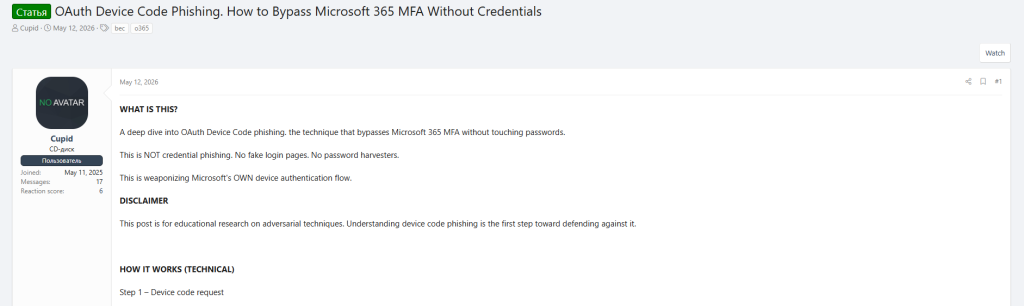
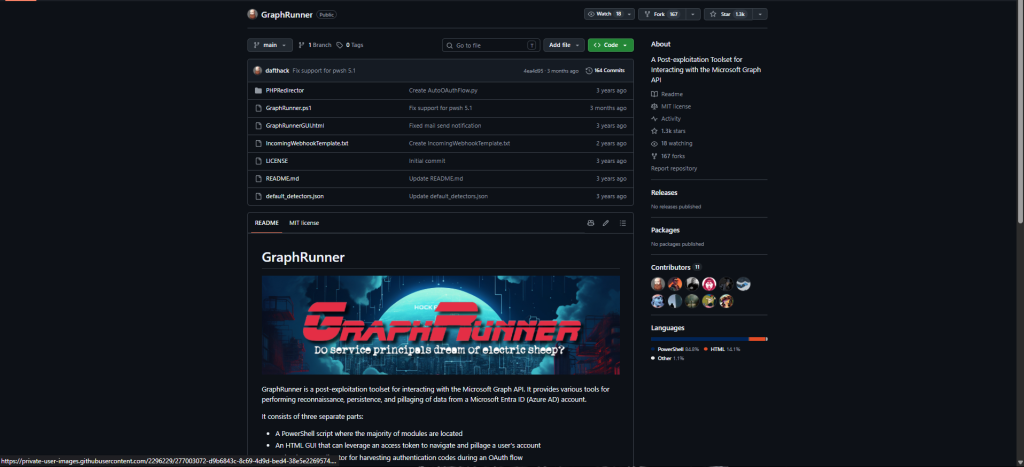
We have also observed widespread adoption of a legitimate open-source tool hosted on GitHub that has been repurposed by threat actors to facilitate Device Code phishing attacks. Discussions across multiple dark web forums indicate that attackers actively recommend, share, and provide guidance on using this tool, highlighting its effectiveness in automating token theft and simplifying phishing operations against Microsoft 365 environments.
What device code phishing is and is not
Device code phishing is a social engineering attack that abuses the OAuth 2.0 Device Authorization Grant.
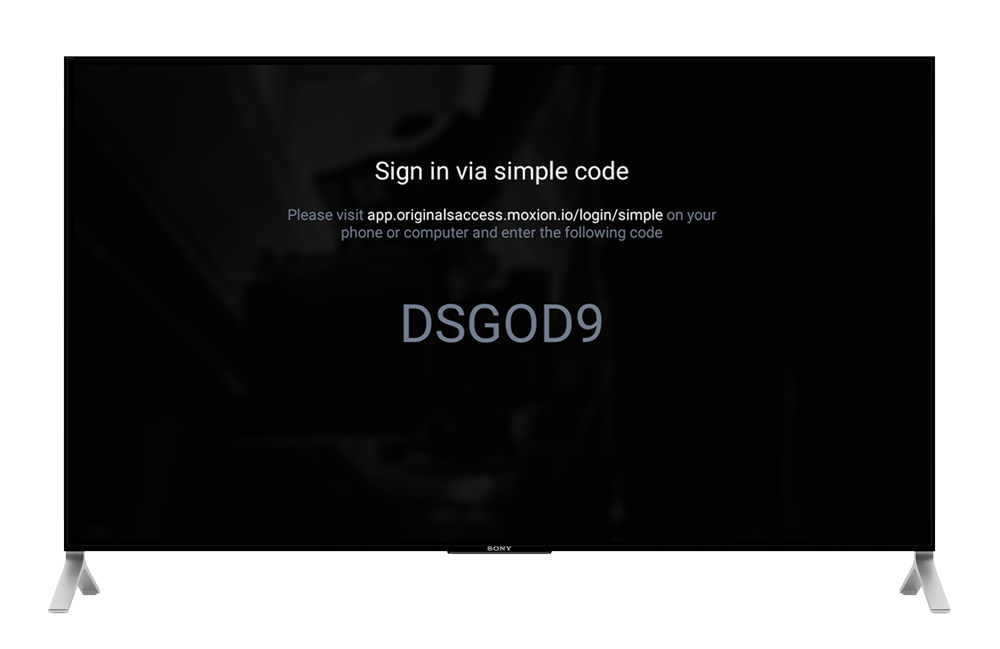
That OAuth flow was designed for devices that are hard to type on, such as TVs, printers, consoles, CLI tools, and shared meeting-room devices. The user signs in on a second device, such as a phone or laptop, while the original device waits for authorization. RFC 8628 defines this flow and also discusses remote phishing as a known risk.
In a normal flow, the device asking for access belongs to the user or organization.
In device code phishing, the attacker controls the client asking for access.
Simple Definition
Device code phishing is social engineering that causes a user to approve an OAuth device authorization request initiated by a client the attacker controls or impersonates. After approval, the attacker-controlled client redeems the device code and receives whatever tokens the authorization server is willing to issue for that client, resource, scope, user, tenant, and policy state.
Device Code Phishing vs. Other Phishing Techniques
Device code phishing is often confused with other attacks, but it works differently.
| Technique | What the victim does | What the attacker receives | Main difference |
|---|---|---|---|
| Credential phishing | Types credentials into an attacker-controlled page | Password and sometimes OTP | The login page is counterfeit or proxied. |
| Adversary-in-the-middle phishing | Authenticates through a reverse proxy | Session cookie or token relayed through the proxy | The attacker is literally in the browser-to-service path. |
| Device code phishing | Enters an attacker-supplied code at the real identity provider | OAuth tokens returned to the client that initiated the device flow | No credential interception is required. |
| Consent phishing | Grants a malicious OAuth application permissions | A delegated permission grant, or an administrator-approved application permission grant | Usually centers on a malicious app and consent screen; device code abuse can instead impersonate an existing client. |
| MFA fatigue | Approves an unsolicited MFA challenge | Completion of an attacker’s credential-based sign-in | Device code phishing begins with an OAuth grant and may invoke MFA as one step. |
| QR or authentication transfer phishing | Scans a QR code that links or transfers an account/session | Depends on the product and transfer protocol | Not every QR-based account-linking attack is OAuth device code flow. |
Device code phishing can overlap with consent phishing, QR phishing, browser-in-the-browser lures, and vishing, but these are delivery or authorization variations, not synonyms.
It is a documented risk, not a surprise protocol flaw
RFC 8628 explicitly describes remote phishing: an attacker can initiate a flow on a device in the attacker’s possession and email a user the verification URL and code. The RFC recommends that the authorization server explain that the user is authorizing a device, show information about that device, and ask the user to confirm that the same code is visible on a device they possess. It also recommends a short lifetime for codes, while acknowledging that a real-time phisher can simply present a fresh one.
Calling the technique an “OAuth vulnerability” obscures the real issue. The protocol deliberately separates:
- the client requesting authorization;
- the browser in which the user authenticates; and
- the resource server later accepting the access token.
That separation is necessary for constrained devices. It also creates a social trust problem: the human must correctly understand which client is being authorized.
The legitimate protocol
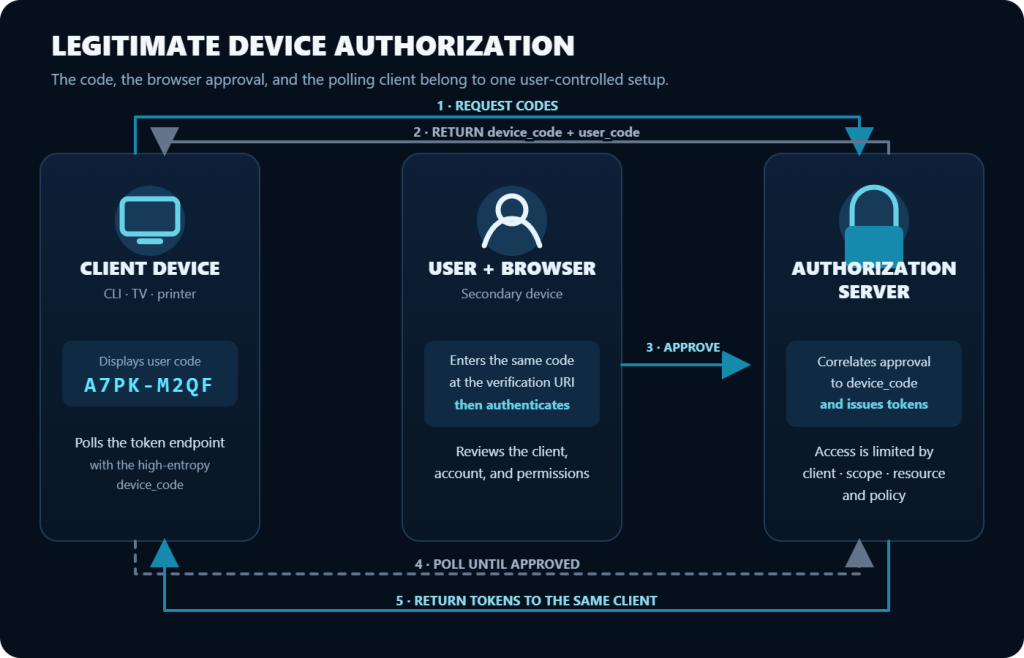
Protocol actors
| Actor | Role |
|---|---|
| Resource owner | The user whose data or capabilities are being delegated. |
| Device client | The constrained or browserless application requesting authorization. It is usually a public client because it cannot safely hold a client secret. |
| Authorization server | Authenticates the user, evaluates policy and consent, correlates the two legs, and issues tokens. |
| User agent | The browser on the secondary device. |
| Resource server | The API or service that accepts the access token, such as Microsoft Graph or the GitHub API. |
Step 1: the client requests a code
The client sends its client_id and requested scope values to the device authorization endpoint. A legitimate implementation makes this request only when the user is ready to sign in. Under Microsoft’s device authorization grant, the user currently has 15 minutes to complete sign-in.
Step 2: the authorization server returns two different codes
| Field | Exposure | Purpose | Security significance |
|---|---|---|---|
device_code | Client only | High-entropy handle used at the token endpoint | This is the credential held by the polling client. It should never be shown to the user. |
user_code | User-facing | Short code the user enters in a browser | It is optimized for typing, so rate limiting and expiry are important. |
verification_uri | User-facing | Page at which the user enters the code | Often an unmistakably legitimate identity-provider URL. |
verification_uri_complete | Optional in RFC 8628 | URI that already contains the user code | Reduces friction but increases the importance of an explicit device-possession check. Microsoft’s v2 endpoint documentation says it does not currently return this field. |
expires_in | Client | Lifetime of both codes in seconds | Limits static campaigns, not on-demand generation. |
interval | Client | Minimum delay between token polls | Prevents excessive polling. The RFC default is five seconds when omitted. |
Step 3: the client polls
The client repeatedly sends the device_code, its client_id, and the device-code grant type to the token endpoint. Before approval, the expected result is an error such as authorization_pending. Polling faster than allowed produces slow_down; RFC 8628 says the client should increase its interval by five seconds for that and subsequent requests.
Typical terminal states include:
access_deniedor a provider-specific equivalent when the user declines;expired_tokenwhen the code lifetime ends;- a provider-specific “bad verification code” result for an invalid code; and
- a successful token response when authorization completes.
Step 4: the user authorizes in the secondary browser
The user visits the verification URI, enters the user_code, selects or signs into an account, completes required authentication, reviews the named application or device, and approves or declines.
Authentication and authorization are separate decisions. A password, passkey, or MFA step proves the user’s identity. The approval step delegates capability to the requesting client.
Step 5: tokens return to the polling client
The next valid poll can return an access token. An ID token appears only when OpenID Connect scopes justify one. A refresh token depends on provider behavior and requested scope; in Microsoft’s v2 endpoint, offline_access must be explicitly requested for a refresh token to be returned.
The access token is not a universal skeleton key. It is intended for a particular audience and carries a defined set of delegated permissions. The resource server still makes authorization decisions when it receives the token.
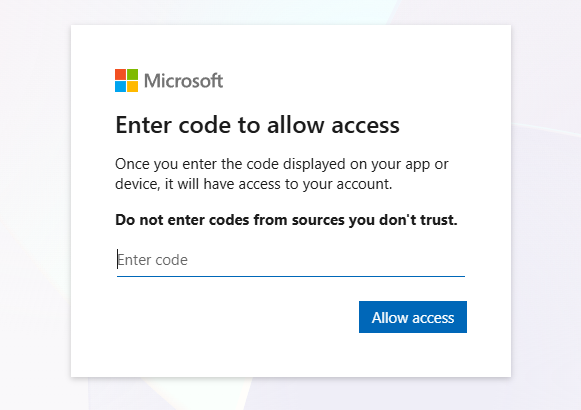
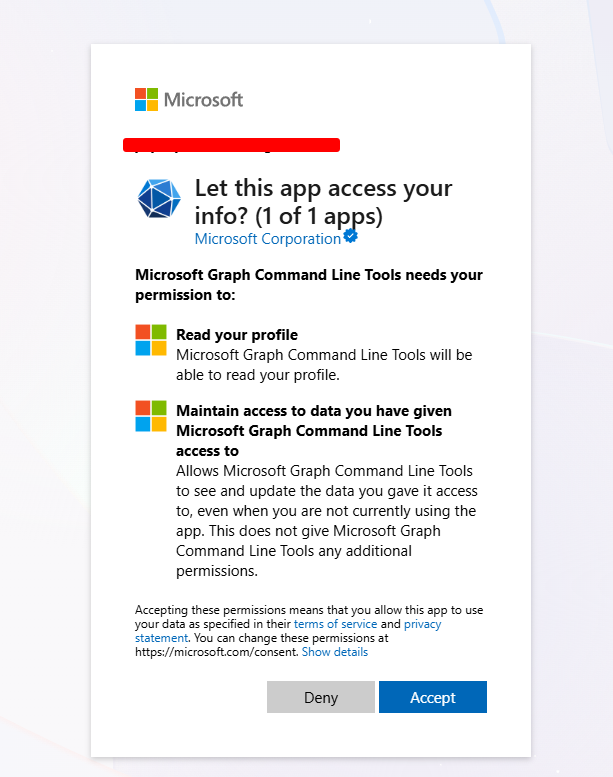
The following prompt was captured in a controlled personal-account test using Microsoft Graph PowerShell, the consumers authority, and the minimal delegated User.Read permission.

Where the Attakers Enters the Flow
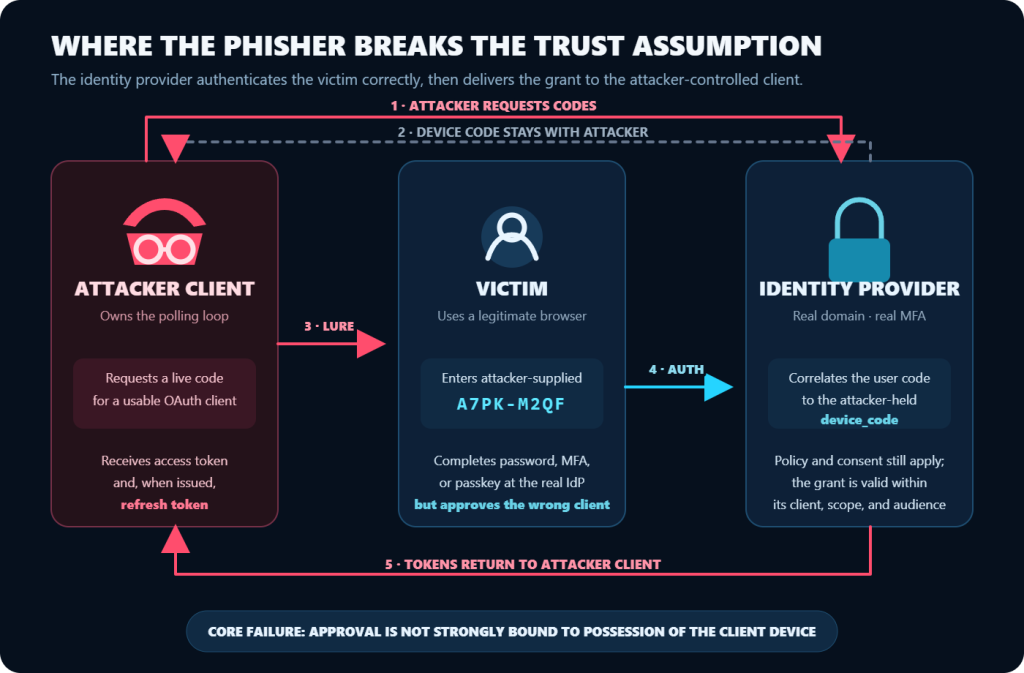
The attack, one decision at a time
- The attacker selects a client capable of device authorization and requests a new code.
- The attacker keeps the high-entropy
device_codeand starts polling. - The victim receives the short
user_codeinside a lure, on a landing page, over a phone call, in a QR workflow, or through a compromised account. - The victim opens the identity provider’s real verification page and enters the code.
- The victim authenticates and approves the named client.
- The token endpoint delivers tokens to the attacker’s polling client.
- The attacker validates access and begins activity allowed by the token.
Static Codes vs. Dynamic Device Code Phishing
Early campaigns could place a pre-generated code directly in an email. That was fragile because the code could expire before the victim opened the message.
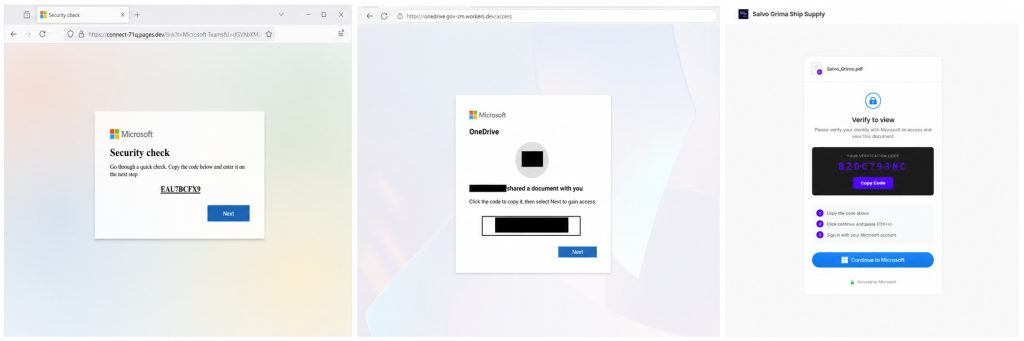
Modern campaigns generate the code only after the victim reaches the last landing page or clicks “continue.” Microsoft’s April 2026 investigation documented:
- code generation at interaction time;
- browser-in-the-browser or blurred-document lures;
- clipboard APIs that automatically copied the code;
- serverless and platform-as-a-service infrastructure;
- periodic status checks while the victim authenticated; and
- role-aware lures shaped with generative AI.
Short lifetimes still reduce delayed reuse and brute force. They no longer provide strong protection against a real-time service that can mint a fresh code per visitor.
Common Device Code Phishing Lures
Common lures include:
- fake Teams meetings and online-event invitations;
- WhatsApp or Signal rapport followed by a meeting request;
- shared document, PDF, e-signature, voicemail, invoice, RFP, and manufacturing workflow notices;
- “device compliance,” “security revalidation,” or “account expiration” instructions;
- QR codes that move the victim from email to a mobile browser; and
- intra-organization follow-on messages sent from a compromised mailbox.
The middle of the chain may contain malicious infrastructure even when the final identity page is real. That is why email, redirect, and browser telemetry still matter.
The attacker’s prerequisites and constraints
A successful attempt normally requires all of the following:
- a client registration that supports the device flow;
- a client and requested permissions usable in the victim’s tenant;
- an account permitted to use the client and target resource;
- satisfied consent or preauthorization requirements;
- a device-code flow that is not blocked by policy;
- completed user interaction before expiry; and
- downstream activity that remains within token scope and resource authorization.
The technique fails when the code expires, the user declines, consent is unavailable, the app is disabled or restricted, Conditional Access blocks the authentication flow, the account cannot access the resource, or the requested token cannot be used from the attacker’s context.
Why common controls do not automatically stop it
“The URL is real”
Correct, but insufficient.
TLS tells the user that Microsoft, GitHub, Google, Okta, or another provider operates the page. It does not prove that the client waiting for the result is on the desk in front of them. A good user rule must therefore be contextual:
Never enter a device code unless you initiated a sign-in on a device you possess and that same device is currently showing the same code.
MFA
MFA is not necessarily bypassed. It can be completed successfully at the real identity provider. The problem is that the resulting authorization belongs to the client that initiated the device flow.
This nuance matters for both training and architecture. MFA remains essential against password theft, spraying, and many other attacks. It is simply not a substitute for blocking a risky authorization flow.
FIDO2 security keys and passkeys
FIDO credentials protect the origin of the authentication ceremony. In this attack, the origin can be legitimate. The user uses the passkey at the correct identity-provider domain, so WebAuthn’s anti-phishing property is satisfied.
That does not mean passkeys are weak. It means they answer a different question: “Is the user authenticating to the legitimate relying party?” Device code phishing adds another: “Is the user intentionally authorizing the client that will receive the token?”
Number matching and MFA-fatigue controls
Number matching reduces blind push approval. A device-code victim may be fully engaged, reading and typing the code deliberately. The decisive mitigation is explicit client/device context plus policy, not a more demanding MFA prompt alone.
Password changes
Changing a password is not a universal token kill switch. Microsoft applies different revocation behavior depending on how the password is changed and whether the token is password-based, non-password-based, or issued to a confidential client. Do not rely on a password change alone. Revoke active sessions and separately remove grants, devices, rules, and credentials created during the session.
Access tokens and application-issued cookies introduce another boundary:
- an Entra access token is ordinarily useful until expiry unless the resource supports Continuous Access Evaluation;
- a web application’s own session cookie is controlled by that application; and
- an OAuth permission grant can enable new tokens until the grant is removed.
Sender-constrained tokens
OAuth security best practice recommends sender-constrained tokens such as DPoP or mutual TLS to reduce replay of stolen bearer tokens. These are valuable when an attacker steals a token from a legitimate client.
They are not a complete answer to device code phishing. If the attacker is the client that initiated the authorization and owns the proof key, a token bound to that attacker-held key is still usable by the attacker. Cryptographic token binding cannot correct a user’s mistaken authorization of the wrong client without an independent trust decision about the client.
Conditional Access
Conditional Access is still evaluated during the flow. Supported conditions such as sign-in risk, network location, and authentication strength can block or constrain access.
There is an important device-state limitation. Microsoft states that managed-device grant controls and device-state conditions are not supported for the device-code OAuth flow because the browser completing authentication cannot communicate the state of the client that requested the code. Device compliance can still protect later resource access where supported, but it does not validate the client receiving the initial tokens.
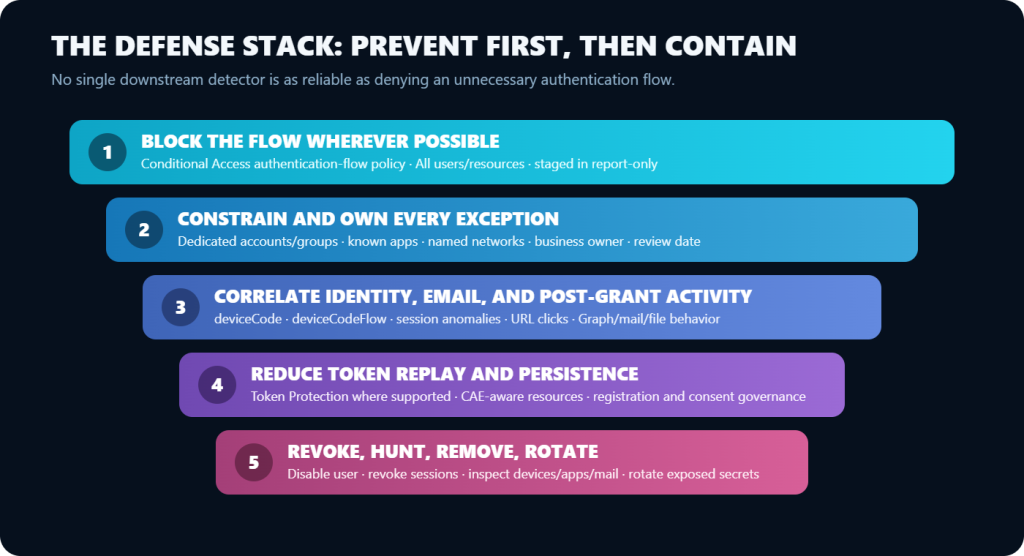
If a tenant allows device code flow and all other supported conditions are satisfied, the policy engine has no universal way to know whether the human was deceived. Microsoft therefore exposes authentication flow itself as a Conditional Access condition and recommends blocking device code flow wherever possible.
What the attacker actually gets
Common shorthand around this technique, including “full account takeover,” “MFA bypass,” or “90 days of access,” can be directionally useful but technically sloppy. Impact depends on the artifact issued and what follows.
Token and session model
| Artifact | Typical Microsoft lifetime | What it enables | Important caveat |
|---|---|---|---|
| Access token | Variable, commonly 60–90 minutes | Calls to one resource within granted permissions | Audience-restricted; CAE-capable resources can reject it before expiry. |
| Refresh token | 90 days by default outside listed 24-hour cases | Requests new access/refresh token pairs for the same user-client combination | Not bound to one resource or tenant; usable only where that client and user are authorized. Revocable; replacement does not automatically invalidate the previous refresh token in Microsoft’s implementation. |
| Primary Refresh Token (PRT) | 90 days, rolling when actively used | Device SSO and access-token acquisition | Bound to a device or on-device cryptographic key. Registered and unregistered variants exist; neither proves management or compliance. |
| App session cookie | Set by the application | Continued browser session in that application | Entra cannot directly revoke a cookie issued and governed by another application. |
| OAuth delegated permission grant | Until removed or otherwise invalidated | Allows the client to request tokens for granted delegated permissions | Deleting the grant stops new tokens for those permissions, but existing access tokens can remain valid until expiry. |
These values are defaults, not guarantees. Token type, client, tenant policy, and provider behavior can change them.
Immediate access
The first access token may enable:
- Microsoft Graph directory and profile discovery;
- email search and collection;
- OneDrive or SharePoint access;
- Teams or other collaboration data;
- Azure or other management APIs, when the selected client and permissions permit it;
- GitHub API access to repositories and workflows; or
- another provider-specific API.
The token cannot exceed the user’s effective privileges at the resource. A low-privilege user still creates risk through data access, internal trust, and lateral phishing, but does not automatically become an administrator.
Refresh-token persistence
When issued, a refresh token lets the attacker return for new access tokens without asking the victim to repeat MFA on every refresh. Conditional Access and risk can still interrupt redemption, and administrative revocation can invalidate the session.
Device registration and PRT acquisition
Microsoft reported that Storm-2372 shifted to the Microsoft Authentication Broker client in February 2025. The resulting refresh token could be used to request a token for Device Registration Service, register an actor-controlled device, and obtain a PRT tied to that device.
Microsoft distinguishes registered-device PRTs from unregistered-device PRTs. Only a registered-device PRT can satisfy device-based authorization requirements. The Storm-2372 chain specifically sought registration of an actor-controlled device; it should not be generalized into a claim that every PRT requires device registration.
Three further distinctions prevent overstatement:
- The PRT is bound to the attacker-controlled device; it is not a freely replayable bearer token in the ordinary sense.
- An Entra-registered device is not automatically Entra-joined, Intune-managed, or compliant.
- A policy that merely checks for a registered device is weaker than one that requires compliance, approved management state, or another supported device assurance.
Post-compromise activity
Real campaigns and defensive reports describe:
- searching mail for credentials, remote-access tooling, government terms, and sensitive projects;
- bulk email or file collection through APIs;
- creation or modification of inbox and forwarding rules;
- internal phishing from the compromised account;
- organizational reconnaissance;
- registration of a new device;
- BEC preparation and payment-fraud monitoring; and
- in developer environments, repository cloning, workflow modification, runner abuse, and secret exposure.
Persistence is not limited to refresh tokens. Responders must hunt for every change made with the session.
Those capabilities explain why the technique progressed from targeted tradecraft to commercial phishing services.
Campaign Evolution: research technique to criminal service
Before 2025: known protocol risk and red-team tradecraft
The remote-phishing threat has existed in the RFC since 2019. Security researchers and red teams demonstrated Microsoft-focused device code phishing before it became a widely reported intrusion technique.
2024 to early 2025: Storm-2372
Microsoft assessed with moderate confidence that Storm-2372 aligned with Russian interests and tradecraft. The campaign, active since at least August 2024, targeted government, NGOs, IT and technology, defense, telecommunications, health, higher education, and energy across Europe, North America, Africa, and the Middle East.
The group developed rapport through WhatsApp, Signal, and Teams-themed interactions, then sent meeting invitations that caused users to complete a device-code authentication. Microsoft observed Graph-based mail searches, email exfiltration, lateral phishing, regionally appropriate proxies, and the later device-registration/PRT chain.
Several Russian threat clusters targeting Microsoft 365 device authentication in early 2025. It tracked the activity as UTA0304, UTA0307, and a third cluster it assessed with medium confidence to be CozyLarch, which overlaps with APT29/Midnight Blizzard. UTA0307 was already using an interstitial page that generated a fresh code per visit, polled for success, and then redirected the victim to a real Teams meeting. This showed that dynamic generation was operational by February 2025, before its later criminal productization.
October 2025 onward: broader criminal adoption
TA2723 began device-code phishing in October 2025, using URL, QR, and code-based lures. This stage marked broader adoption beyond highly tailored state-linked operations.
March 2026: EvilTokens
EvilTokens is a turnkey device-code phishing-as-a-service offering advertised through cybercrime channels. Microsoft later said that widespread 2026 activity aligned with the emergence of EvilTokens and described the service as a key driver of large-scale abuse. The campaign featured:
- dynamic per-visitor codes;
- automation and short-lived polling infrastructure;
- individualized lure content;
- redirect chains and compromised sites;
- automated validation and reconnaissance; and
- post-compromise mailbox activity.
April and May 2026: Kali365
A separate Kali365 ecosystem was observed. On 21 May 2026, the FBI’s Internet Crime Complaint Center issued a public warning that Kali365 provided AI-generated lures, campaign templates, real-time tracking, and Microsoft 365 token capture through a subscription model.
The strategic change is not a new protocol primitive. It is productization. The operator no longer needs to understand OAuth deeply; the service generates codes, tracks victims, polls for completion, and packages access.
What “AI-generated” means here
AI is used for operational automation such as:
- generating role- and industry-specific lure text;
- scaling unique messages so campaigns have less repeated content;
- assisting reconnaissance and target prioritization;
- automating infrastructure and campaign management; and
- accelerating post-compromise analysis.
Defenders should resist magical claims. The enabling weakness remains the human approval of a remotely initiated authorization.
Microsoft Entra ID and Microsoft 365 specifics
Most publicly documented campaigns center on Microsoft 365, so its implementation deserves separate treatment. Microsoft is the best-documented target ecosystem, not the only implementation of RFC 8628.
Public clients and client impersonation
Device clients are usually public clients: software distributed to users cannot safely hold a universal client secret. Anyone who knows a public client_id can ordinarily identify as that client at the device authorization endpoint.
That does not mean every public client works against every tenant or resource. Results depend on:
- whether the app supports public-client/device flow;
- its configured permissions and preauthorization;
- tenant and user consent state;
- resource access;
- Conditional Access; and
- provider-side abuse protections.
Published client-ID lists age quickly and are a poor defensive baseline. Defenders should derive their approved app baseline from their own sign-in logs and Microsoft’s service-principal data, not assume a published table is exhaustive.
Authentication is not the same as consent
A user can authorize an already trusted or preauthorized client without seeing a classic “this app wants these permissions” consent prompt on every sign-in. Conversely, a newly registered malicious multitenant app can trigger consent or require admin approval.
This creates two related but distinct defenses:
- Authentication-flow policy controls whether device code flow is allowed.
- Application consent policy controls which apps and permissions users may approve.
Restricting user consent to verified publishers and selected low-impact permissions is good governance. It does not neutralize device code abuse that impersonates an existing approved client.
allowPublicClient / “Allow public client flows”
For an application registration the organization owns, setting “Allow public client flows” to No prevents that app from using device code and certain other public-client flows. This is useful app hygiene.
It is not a tenant-wide control and does not change Microsoft-owned or third-party app registrations. Do not present it as a replacement for Conditional Access.
Family refresh tokens and broker clients
Some Microsoft first-party clients participate in a family of client IDs, allowing refresh-token portability among related clients under defined platform rules. Storm-2372’s switch to Microsoft Authentication Broker mattered because it enabled a path from the initial delegated grant to Device Registration Service and then a PRT.
This should be treated as a specific observed chain, not a guarantee that any device code, client, or refresh token can mint a PRT.
Conditional Access protocol tracking
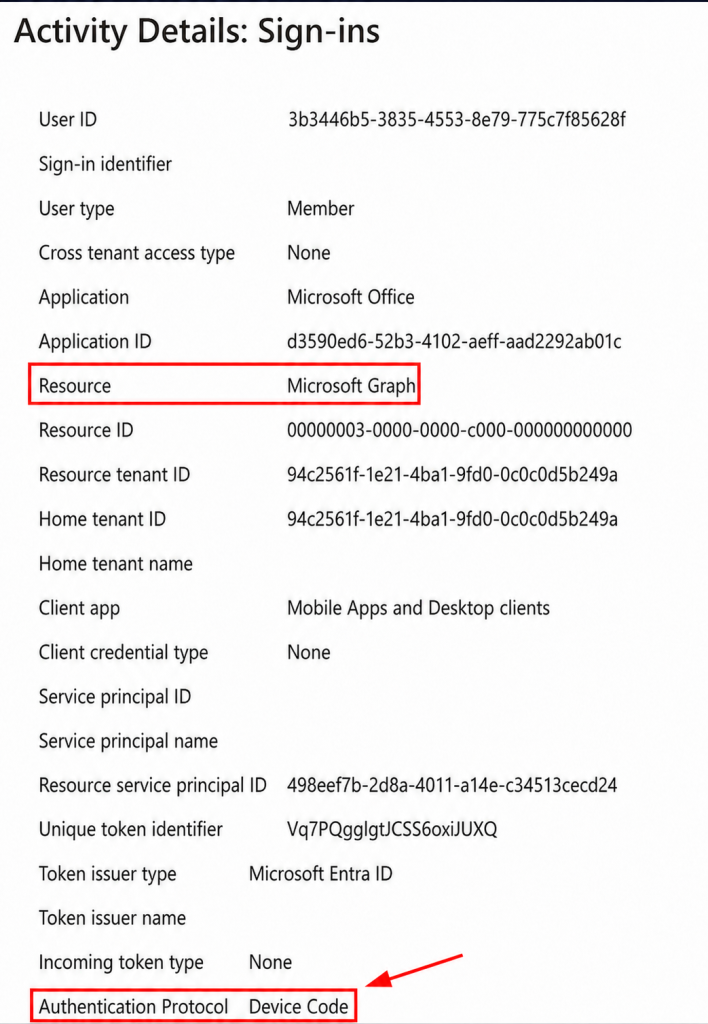
Microsoft marks sessions that originated with device code flow as protocol-tracked. The state can persist through refreshes, which is why a later sign-in may show:
- an authentication protocol other than device code for the current request; but
OriginalTransferMethodindicating device code flow.
An authentication-flow Conditional Access policy can therefore block later use of a device-code-derived session when the policy scope covers the requested resource.
The illustrative sign-in details below show the fields that identify an initiating event: Microsoft Graph as the resource and Device Code as the authentication protocol. A later refresh may use another current protocol while preserving device code flow in Original transfer method.
Device Registration Service exclusion: conditional, not universal
Since September 2024, Microsoft has enforced authentication-flow policies on Device Registration Service when policies target all resources.
Organizations that legitimately use device code flow for device registration, especially supported Teams device scenarios, must account for this. Microsoft’s current Teams guidance uses two layers:
- exception groups for the resource accounts that truly need device code flow; and
- exclusion of the Device Registration Service resource from the blocking policy.
Do not blindly copy the exclusion into every tenant. First determine whether device-code-based registration is a required business dependency. An unnecessary exclusion preserves attack surface.
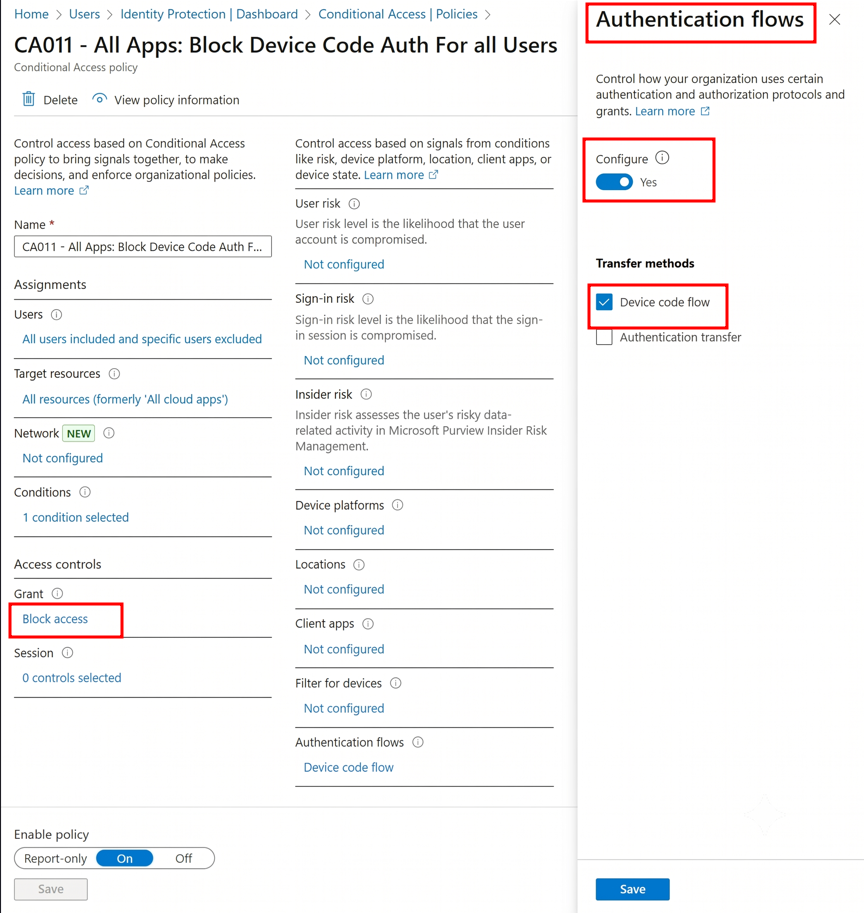
For organizations without a documented business requirement for device code authentication, Microsoft recommends blocking the flow through Conditional Access. The policy should target all users and resources, exclude only validated dependencies and emergency-access accounts, and use the Device code flow authentication-flow condition with Block access.
Begin in Report-only mode to identify legitimate usage and evaluate policy impact. After validating the required exceptions, enable enforcement. Microsoft Entra ID P1 or higher is required for users covered by Conditional Access.
GitHub, Google, Okta, and the Wider Ecosystem
RFC 8628 is provider-independent, but platform controls and telemetry differ substantially.
GitHub
GitHub supports the device flow for headless applications such as CLI tools and Git Credential Manager. The app owner must enable device flow in the app registration.
Praetorian’s 2025 red-team research demonstrated that GitHub device authorization can be socially engineered to obtain an OAuth token with repository and workflow impact. The potential blast radius includes:
- private source-code access;
- workflow changes;
- self-hosted runner exposure;
- access to artifacts;
- downstream supply-chain risk; and
- secrets present in repositories, build output, or reachable systems.
The exact effect depends on granted scopes, SSO authorization, organization policy, repository permissions, and GitHub’s evolving token controls.
Defensive controls include:
- OAuth app access restrictions for organization resources;
- review and approval of OAuth apps;
- SSO and IP allow-listing where operationally feasible;
- audit-log monitoring; and
- rapid credential/SSO revocation during an incident.
These are partial controls, not an equivalent to Entra’s tenant-wide authentication-flow block. GitHub does not document an organization-wide switch that disables device flow across every client. GitHub-owned privileged OAuth apps, including GitHub CLI, Git Credential Manager, Visual Studio, and Visual Studio Code, can access organization data despite OAuth app access restrictions, and their authorization may not appear in the organization audit log. Downstream Git and API activity therefore remains essential telemetry.
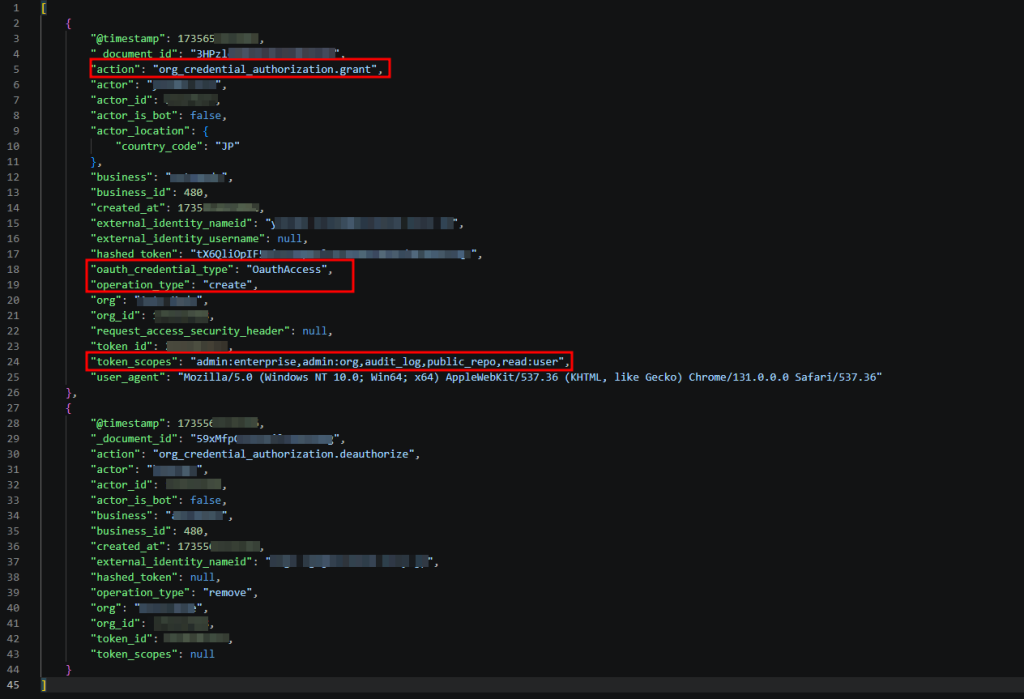
The event org_credential_authorization.grant records that a member authorized credentials for SAML or OIDC SSO and includes useful fields such as token scopes and OAuth application identifiers. It is not a generic device-flow event and will not appear for an ordinary personal-account or non-SSO OAuth authorization. Even where it is available, post-grant behavior must supply context.
The sanitized organization audit event below exposes the authorization action, OAuth credential type, token scopes, user agent, and organization context. Its OAuthAccess credential type is consistent with an OAuth authorization. Those fields make it a useful pivot, but the event does not prove device flow by itself.
Other providers
Google supports OAuth for TVs and limited-input devices, while Okta implements the Device Authorization Grant through its authorization-server and client configuration. The protocol creates the same general remote-authorization risk, but Microsoft-focused campaigns dominate public reporting. Organizations should validate their own provider controls and telemetry instead of copying Entra field names or token assumptions.
A platform comparison
| Question | Microsoft Entra | GitHub | Google / Okta |
|---|---|---|---|
| Is device flow supported? | Yes | Yes, when enabled for the app | Yes |
| Main public abuse reporting | Extensive, including state and criminal campaigns | Strong red-team research; public in-the-wild picture is less complete | Protocol risk is real; public campaign evidence is comparatively limited |
| Primary preventive control | Conditional Access authentication-flow policy | No documented organization-wide device-flow block; govern non-privileged apps, SSO/network access, and downstream permissions | Provider/client policy; validate locally |
| High-value telemetry | AuthenticationProtocol, OriginalTransferMethod, SessionId, risk, app/resource, device registration | OAuth/credential authorization, token scopes, app identifiers, Git and API activity; expect privileged-app visibility gaps | Provider-specific auth, consent, token, and API logs |
Conclusion
Device code phishing succeeds because the identity system authenticates the right person for the wrong client context.
The password can remain secret. The domain can be authentic. MFA and passkeys can succeed. None of those facts establishes that the user initiated the client waiting for the token. When the victim approves an attacker-supplied code, the authorization server correctly delivers tokens to the client that began the flow.
The protocol is not confusing identities or failing to authenticate the user. The attack exploits the separation between the browser where approval happens and the device where the authorization began. Modern campaigns have turned that gap into a scalable service through dynamic codes, polished lures, automated polling, and rapid post-compromise activity.
For organizations using Microsoft Entra, the practical question is simple:
Where is device code flow genuinely required?
If the answer is “nowhere,” block it. If a small number of Teams devices, command-line tools, or constrained-device workflows require it, keep those exceptions narrow and deliberate.
Device code phishing is not conventional credential theft and does not require MFA to fail. It is the abuse of a legitimate authorization ceremony after the attacker persuades the victim to complete it on the wrong client’s behalf. Understanding that distinction is the key to understanding the attack.
Frequently Asked Questions About Device Code Phishing
What is device code phishing?
Device code phishing is a social engineering attack where an attacker convinces a user to enter an attacker-supplied OAuth device code on a real identity-provider page. If the user approves the request, tokens are issued to the attacker-controlled client.
Does device code phishing bypass MFA?
Not always. In many cases, MFA works as designed. The issue is that the user completes MFA while authorizing the attacker’s client session.
Why does a real Microsoft login page not make the request safe?
A real login page proves the identity provider is genuine. It does not prove that the client waiting for the token is trusted or physically in front of the user.
How do organizations prevent device code phishing in Microsoft Entra?
Organizations that do not need device code flow should block it with Conditional Access authentication-flow policies. Exceptions should be limited to validated business use cases.
Is device code phishing only a Microsoft 365 problem?
No. The OAuth Device Authorization Grant is provider-independent. Microsoft 365 has the most public reporting, but device-flow risks can apply to other providers that support the flow.



No Comment! Be the first one.